Logo
=====
Logo is the best and simplest way to start real programming.
- Text based ... start with a blank page
- fun
![]
(/media/dra/computing/logo-programming/logotitle.png)
###Traffic Light Check
- Click the green button on each page if you understand
- Click Amber if you are not sure and would like to come back to check
- Click Red if you are stuck
The colours will be saved locally. Only on the machine you are using now.
Note for Teachers
- Navigation is roughly organised by technique (repeat/subs/abstraction) rather than
outcome (SQU, TRI, PENT, CIRC HOUSE, STREET, FOREST) but this rule has been broken.
---------------
Getting Started
===============
Open the link below (right click > open in a new browser tab so you can switch back and forth).
This site is an Online Logo Interpreter
Remember to keep this window open.
You can always open it from this page if you accidently close it.
type the following in the box at the bottom
>`forward 100`
Click Run
Then try
>`right 90`
Don't forget to click run
###Hint
You can use the short commands `fd 100` and `rt 90`
###Task: draw a square
Then try a hexagon and a triangle
###Traffic Light Checkpoint
- I am confident in drawing different shapes
####Additional resources
- [Wikipedia Logo Programming](http://en.wikipedia.org/wiki/Logo_(programming_language))
- [Javascript turtle](https://mobile.aau.at/~welmenre/res/JSTurtlegraphics/turtlegraphics.html) Alternative online Turtle Logo for primary school but too simple eg. you can't use brackets
- [Turtle academy](http://turtleacademy.com/learn.php) A similar approach to the one used here. But much more text.
- [Logo to download ](http://fmslogo.sourceforge.net/)(not usually necessary unless you are travelling)
-----
Repeat
======
It gets boring typing all these commands. Using repeat is quicker. Try this command
>`repeat 4 [fd 100 rt 90]`
###Hint:
These are square brackets not curly ones!
###Task: draw a pentagon
Then an octagon, decagon [(What?)](http://uk.ask.com/question/what-is-a-ten-sided-polygon-called), a 10 sided shape, then finish with a circle
###Traffic Light Check
- I have done the task and understand it
------------
Sub Routines
============
###Which is easier to understand and type?
>`repeat 4 [fd 100 rt 90]`
or
>`squ`
We are going to teach the computer how to SQU. Using the following code
to SQU
repeat 4 [fd 100 rt 90]
end
1. We need a bit more space so open the command window using the black arrow
[HELP!!](/media/dra/computing/logo-programming/logointerpretertoggle.png)
2. Enter your code (from above)
2. Click Run
2. Click on Library (top right) to check that your code has been saved.
4. Then to use the SQU command simply type SQU underneath
5. The command `clearscreen` might be useful
###Task:
- Create a sub for TRI (a triangle)
- Create at least 2 subs for other shapes we have made PENT, HEX, CIRC etc
###Theory
When programming it's good name different bits of code.
These different bits of code are called sub routines (we could also say: procedure, a function, a method or just a routine).
Looking at it the other way around we could say that we are going to give a name to the `repeat 4 [fd 100 rt 90]`
code that we have been using, to make it easier to remember and use.
###Traffic Light Checkpoint
1. I know HOW to use a subroutine
2. I know WHY I am creating a subroutine
--------
Abstraction
========
Now we have named some sub routines we can combine them into new things. It allows us to abstract (hide)
the detail. Programmers also call this black boxing or deconstruction.
This is one of the most important skill that programmers have: computational thinking.
####Task 1: Create a House using SQU and TRI

[HINT (don't use it unless you Reeelly need it!)](/media/dra/computing/logo-programming/logohouse.png)
####Task 2: (Harder) Create a street

###Traffic Light Checkpoint
- I have done house and street
- I know that to find the problems in my code I have to 'debug' it (work like a detective)
- I know that programs are split into pieces which are combined together and this is called abstraction
###See Also
[Wikipedia](http://en.wikipedia.org/wiki/Abstraction_(computer_science))
----------
ARC Challenges
==========
Can you work out how to do the following?
>Use the code
To ARC
repeat 90 [fd 1 rt 1]
END
##1. Flower
Start with the head first

##2. Bird
Can you create a single bird like the ones used in this Flock picture (We will do the whole flock later)

---------
Variables
=========
We can use variables to vary the size of the square

##Task: Use your own variables to change the size of shapes (eg. HEX, TRI, SQU)
###Traffic Light Checkpoint
- I have done the Task on 2 or more shapes. AND I understand why variables are useful
- I have only done square. Why are we doing this?
- I don't understand this
###Extra Challange: Use variables in Subroutines like HOUSE that uses TRI and SQU (this is more complicated that you might think)
-------------
Random Variables
=============
Randomness occurs in nature. Use a random variable is a powerful way for you to easily create a natural effect.
>`random 16` will produce a random variable between 0 and 16
for example random colour using the set pen colour command
>`setpc 16` where the number is one of 16 predefined colours
#Random Challanges


###Checkpoint
1. I have used a random variable creatively to obtain a natural effect
----------
Creativity: Logo Art
==========
The best thing about Logo is having fun and doing something that interests you.
This way you are sure to be creative.
## What do you want to do today?
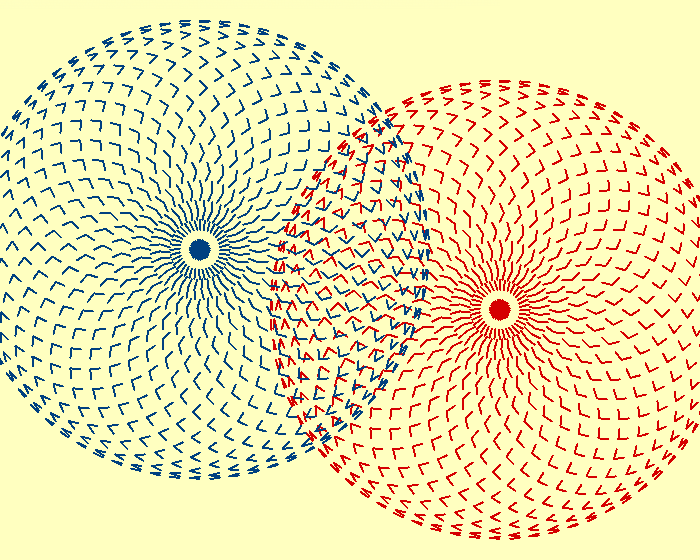
This image is created in Logo. You can [buy a print of it](http://www.artami.co.uk/turtleart/indexdigital.htm) to put on your wall.
You can [buy a book](http://www.blurb.co.uk/b/651323-turtle-art?redirect=true) of images like this which includes the code used to generate it.
- [turtleart.org](http://turtleart.org/gallery/index.html)
- Turtle Art Software [Download Page](http://llk.(/media.mit.edu/courses/software/turtleart/)
- [online manual](http://oneeducationtest.androgogic.com.au/olpcresources/manual/2012-turtle-art)
###Task: Produce your own piece of art
See if you can get it printed in colour
###Traffic Light Checkpoint
- Green: I produced a jpg and sent it to my teacher
- Amber I'm working on this
- Red : I need help
-----------------------
Power of: 15 Word Logo Challanges
=======================
Lots of inspiration here to use tiny amounts of code (15 words max) to produce a big effect
[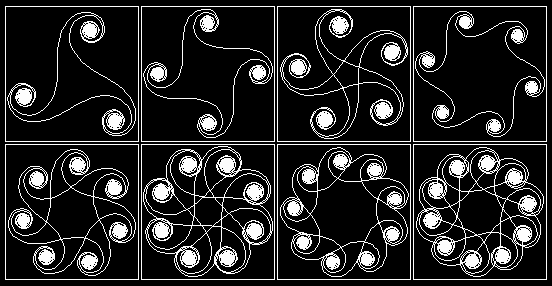](http://www.mathcats.com/gallery/15wordcontest.html)
[click image to visit the site](http://www.mathcats.com/gallery/15wordcontest.html)
###Traffic Light Checkpoint
- I tried some of the 15-word examples
- I changed some of the variables to see what effect they had
---------
Recursion
=========
Recursion is an extremely powerful programming technique. It is a loop that 'calls' itself..
a bit like a snake eating its tail. If you don't tell in when to stop it can crash your computer
- so it can be dangerous
Recursion is used to create fractals

It is useful for searching a file system. It goes down from the root into each and
every branch (folder) of the system. It is also used by nature to create things like trees.
You can see the tree and fern in the examples on [Calormen (Josh Bell's) Logo Interpreter](http://www.calormen.com/Logo/)


Here is TEF's "Papert Logo Online" with code for the
[Koch Snowflake](http://logo.twentygototen.org/_REo_2F2)
###Quote
"The power of recursion evidently lies in the possibility of defining an infinite set of
objects by a finite statement. In the same manner, an infinite number of computations
can be described by a finite recursive program, even if this program contains no explicit
repetitions.
Wirth, Niklaus (1976). Algorithms + Data Structures
http://en.wikipedia.org/wiki/Recursion_(computer_science)#cite_note-3)
###See Also
- [Wikipedia Koch Snowflake](http://en.wikipedia.org/wiki/Koch_snowflake)
- [Wikipedia Fractal](http://en.wikipedia.org/wiki/Fractal)
- [Cargo Bot ]() - Ipad Game (now free). Great for learning recursion without even knowing it!
###Challange/Task
- program the koch snowflake in the Calormen Logo Interpreter
###Traffic Light Checkpoint
This is a complex task which will be beyond the reach of most students.. but have a go!
Most important is to UNDERSTAND
- Green: I completed the task and understand it
- Amber: I am working on the task
- Red : I need help
- Blank: I'll pass on this one
--------------
3D Logo: Elica
==============
Elica is a powerful and modern logo that can produce 3D and moving images.
###See Also:
- [Elica geometry Video (Youtube)](http://www.youtube.com/watch?v=LOnOcBvxOCk&list=PL6534E936D46257BF)
- [Official Elica Site](http://www.elica.net/site/about/about.html) with download link. The demos are great too.
###Traffic Light Checkpoint
I have watched at least 2 videos
---
#Teachers Notes
[link to this lesson](http://openk.net/show.php?f=dra/computing/logo-programming/102.00-intro.md.txt)
- Environment
- Drawing (younger)=> puzzles: golf, maze see app notes
- Repeating / looping => patterns
- colour here?
- Subs
- House, Street
- Black Boxing(abstraction, computational thinking)
- Random Colour
- Variables
- Creativity =>Art,
- Power of: 15-word challanges
- ??Branching if
- ??Swarming - multi agent Logo
- recursion =>tree koch
- 3D logo =>Elica
Also recursive

???


