- Lesson:GoPiGo3
- Please login to keep your results
- Welcome,
The Robots are coming
Discuss these questions in pairs.
- What is a Robot?
- What is AI?
- Is a Chat Bot a Robot? (here is an example)
- Should we be scared of Robots?
- What are a robot’s Inputs?
- What are a robot’s Outputs?


Build GoPiGo
Build instructions on the Dexter Industries site. If this links is broken just Search for the instructions page.
Careful:
- GoPiGo3 instruction not GoPiGo
- Loosing Bits
- Breaking Bits – don’t force things – if you aren’t sure, ask
- Static Electricity
Login to Dexter OS
The simplest way of using GoPiGo is using Dexter OS. This is how you use it.
- Wifi SSID = GoPiGo (this is dangerous if many robots have the same name)
- type dex.local or mygopigo.com into the browser
- Rename your Robot (File > Rename Computer)
- Wifi SSID will now be
<RobotName>
DexterOS has no local login, no ssh or vnc connectvity. If you want to use these tools, you will need “Raspian for Robots”.

Advanced
These are all the OSs (Operating Systems) you can use on your GoPiGo3 SD Card

Distance Sensor
Assembly Instructions

Problems / Tasks
- Stop In front of a wall
- Stop and go round a wall
- Stop turn and find the end of the wall
- Go into either side of the Footwell and come out the other
Servo
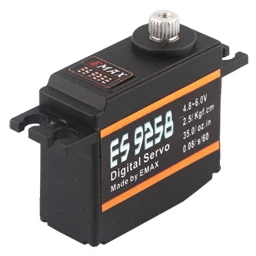
A servo is a special motor (output device) that turns very slowly and it knows the angle of rotation so it can:
- be a hand on a clock
- turn a camera to a certain direction
- elevate a satellite dish to a certain elevation (angle)
Assembly Instructions
Combining Components
Here are some suggestions to try. Come up with your own ideas:
- Servo with Distance Sensor – to look for exit from maze
- Servo with Camera – to film in all directions
- Servo with Servo – rotate + elevate eg. to aim a rocket
- Servo with Light Sensor – to move towards the window
- Distance Sensor x 2 – to look for a gap in a wall
Video Streaming Instructions
Line Follower
- Virtual Line Follower in Scratch Practice without getting your hands dirty
Assembly Instructions

Configure
- In DexterOS click Learn > Line Following
- Read the instructions
- Calibrate for White THEN Calibrate for Black
- Write your program using Blockster Advanced
Course building
- Use 2cm (3/4″) Black Tape
- Five sensors have combinations eg. “wwbww” or “wbbww” or “bbwww”
- Finish course with a T-junction. Robot will stop with “bbbbb”.
- Get the robot to turn round at the end and follow the line back.
- Can you manage a fork?
Lego BrickPi
BrickPi3 allows you to control Lego Sensors and motors. Breathe new life into older NXT and EV3 Lego Kits. Click here for project instructions from Lego
Assembly & Instructions
You will need
– A VNC client to run scratch (see image below)
– Enable VNC on the server
//On the Server
sudo raspi-config
networks > Enable VNC

Notice they haven’t put the cables on yet!

Ball Sorter

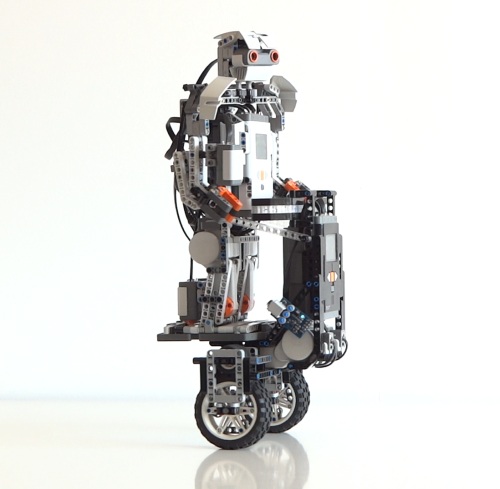
Balance Bot GoPiGo
You will need to rebuild your GoPiGo to get the wheels at the bottom. Instructions
You will need:
– IMU Sensor for Balance (Inertial Measurement Unit)
– IR Sensor and Sender for Remote Control (forward, backward, turn)
– A python script to do the balancing

Lego and BrickPi
You can also do a balance bot with Lego and BrickPi
Notes
- Jupyter
- Hackster.io Projects
- Which SD card?
Issues
- Raspberry Pi clients need Firefox esr (but see Secondary@jis issue) SOLVED: Stretch upgrade has Chromium which works ok with Jupyter
- Raspberry Pi clients are not updating on Secondary@jis (use visitor@jis with pswd) SOLVED: if you install the Certificate
- Multiple Robots on DexterOS mean clashing ssids (Change Robot Name in DexOS > File > Change Robot name
Pimp My Bot


The Real Mars Rover

Colour Stations
- Detect a coloured match on the floor
- Do different tasks at different stations
- A good extension to line following
- But how will you mount your colour sensor?

Robots Meeting
How can 2 robots communicate:
– using Sound?
– using IR?
Explore the basics of communication at a (short) distance
Worm Simulation
Simulate a worm brain. The much studied C Elgans has 302 Nurons and 95 muscles. You will need
– Distance sensor
– Python script needs to be downloaded from github
– Instructions
The Martian (Film Scene)
Program the Pointer … Point with
– The Robot
– The Servo – although our servos only turn through 180 degrees
Facial Emotion Recognition
Let Empathy Bot read your emotions using Google Cloud Vision API for the Artificial Intelligence
Phone Remote
Android doesn’t seem to want to let you get into gopigo3…